Bring Tribal’s multi-org fabric into Cursor, Vibes, and Agentforce
If you manage more than one Salesforce org and/or spend time with different agents that could do with deeper Salesforce org insights, this post is for you.


When I work with clients, I keep seeing the same picture: not one org, but ten, twenty, sometimes a whole estate of Salesforce orgs. Production, sandboxes, regional copies, the org that “should be identical” and never is. Keeping track of configuration, packages, and setup across that lot is the job. Asking an Agent in each org the same question, then attempting to aggregate that afterwards, is not insight. It is homework.
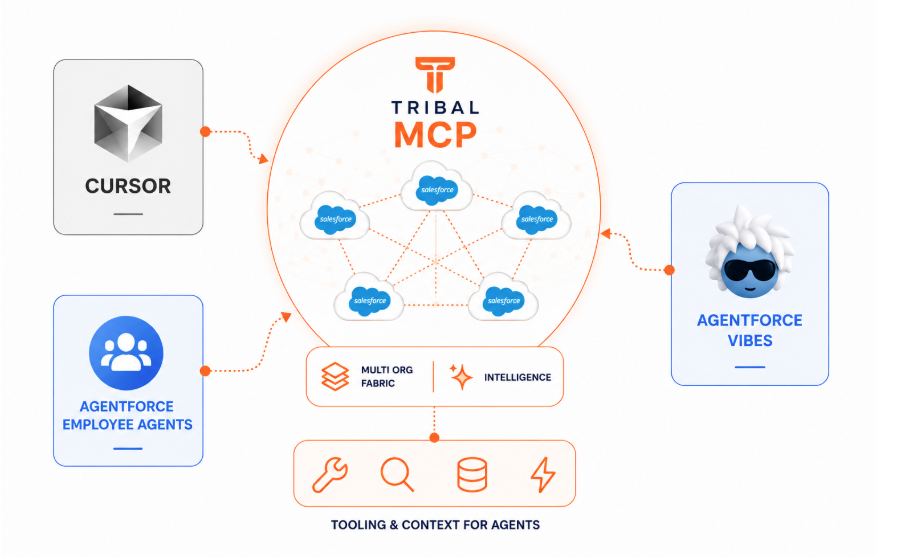
As I explored in my previous blog, Tribal has developed a rich fabric of intelligence over Salesforce orgs, and while you might work on one org at a time — it actually sees all your connected orgs! So in this blog I will share what I found when exploring this aspect further, this time using the new Tribal MCP server. Stepping out of Tribal's user interface and bringing Tribal’s insights into the other agents was my first target — on my list was Setup Agent, Agentforce Vibes, Cursor, and an Agentforce Employee agent — meeting developers or Admins where they live in each case.
Note: At the time of writing, Salesforce Coworker was just being rolled out. It would also be an interesting candidate to explore enriching with Tribal MCP — providing it allows the addition of MCPs.
Here are the questions I then focused on:
“ What packages are installed in this org (andyagent10) compared to andyagent1? ”
“ List places where the fields on the Booking object are referenced. ”
“ If I add a trigger on Booking to calculate total bookings per month on the Experience object, what potential impacts should I be considering? ”
Do the custom fields on the Contact object vary across my orgs? ”
Agent Exploration
I wanted to cover tools in and out of the Salesforce web user interface, so I went for the following:
- Cursor is my daily driver and of course has built-in support for adding MCPs. With the Salesforce Skills installed it does a pretty good job at serving me well. It is, though, a developer tool and runs outside of Salesforce.
- Setup Agent is the in-org assistant for Setup. I found it useful with its starter prompts. It is a first release, with a focused scope, and it is not currently visible or customisable in Agentforce Builder, so I could not add Tribal MCP here.
- Employee Agent, with Agentforce MCP support, is the customisable in-org agent. This is where Admins already live — and where an external brain can be plugged in via External MCP’s under Setup. I got Tribal MCP connected here.
- Agentforce Vibes is the developer agent. It can see more than one org once connected via CLI, but it largely does that by spidering Tooling API into each org one at time.
So in the end I managed to get Tribal to sit inside of three of the four I set out to test. I ran the same prompts against my org, with and without Tribal. The following outlines what tools Tribal MCP brings to your agent, how I was able integrate it into the Salesforce UI via Employee agents and of course how it responded to my test prompts.
What does the Tribal MCP do?
Tribal holds a fabric of intelligence over all the Salesforce orgs you have connected, not just the one you happen to be looking at. The MCP is how another agent asks that fabric a question, instead of you doing the work inside Tribal’s own UI. It does not hand the agent a pile of Salesforce API wrappers. It hands it three tools. tribal_list_orgs returns those connected orgs by name — five in my case. From there the agent submits the question and waits for the answer (Cursor, Vibes).
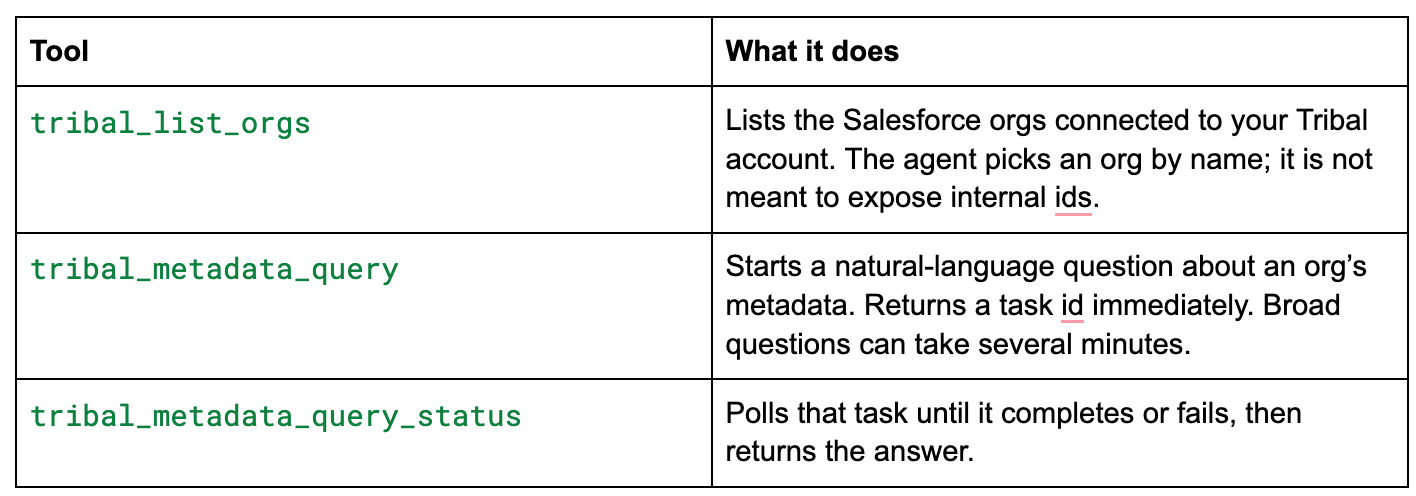
That is the whole surface: which orgs, ask and query for the answer. The depth is in Tribal’s fabric, not in the number of tool calls. That is also why this MCP tends to stay quieter than a Tooling API spider. The product team plans to introduce the Tribal Architect agent, allowing you to move beyond knowing simply 'what' to understanding 'how’.
You can take these same tools into Salesforce. Open the API tab in Tribal to obtain credentials, then register Tribal as an External MCP from the MCP Servers page under Setup. Once it is Active, the three tools show up on the server record — ready to attach to an Employee Agent. Worth noting that at the time of writing, I had to create the Named Credential first; when defining the External Credential, select Pass client credentials in the request body. The automated path from External MCP does not presently expose that option.

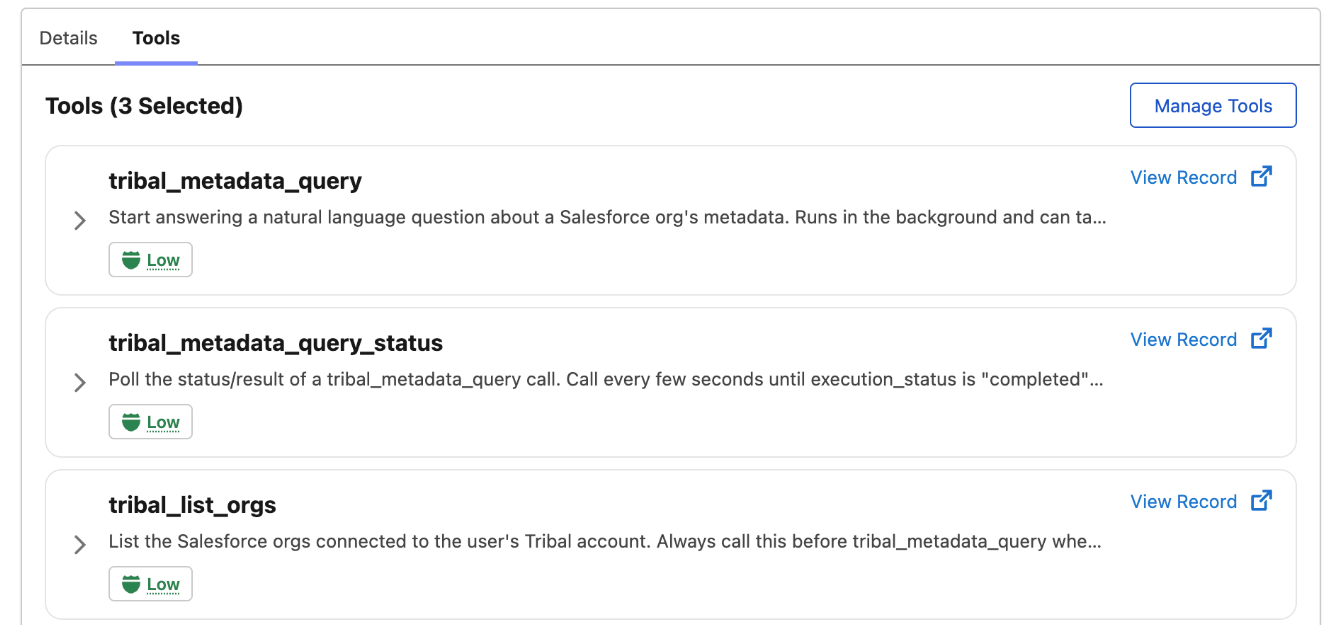
After this I created an Employee Agent and added Tribal MCP to it as a subagent:
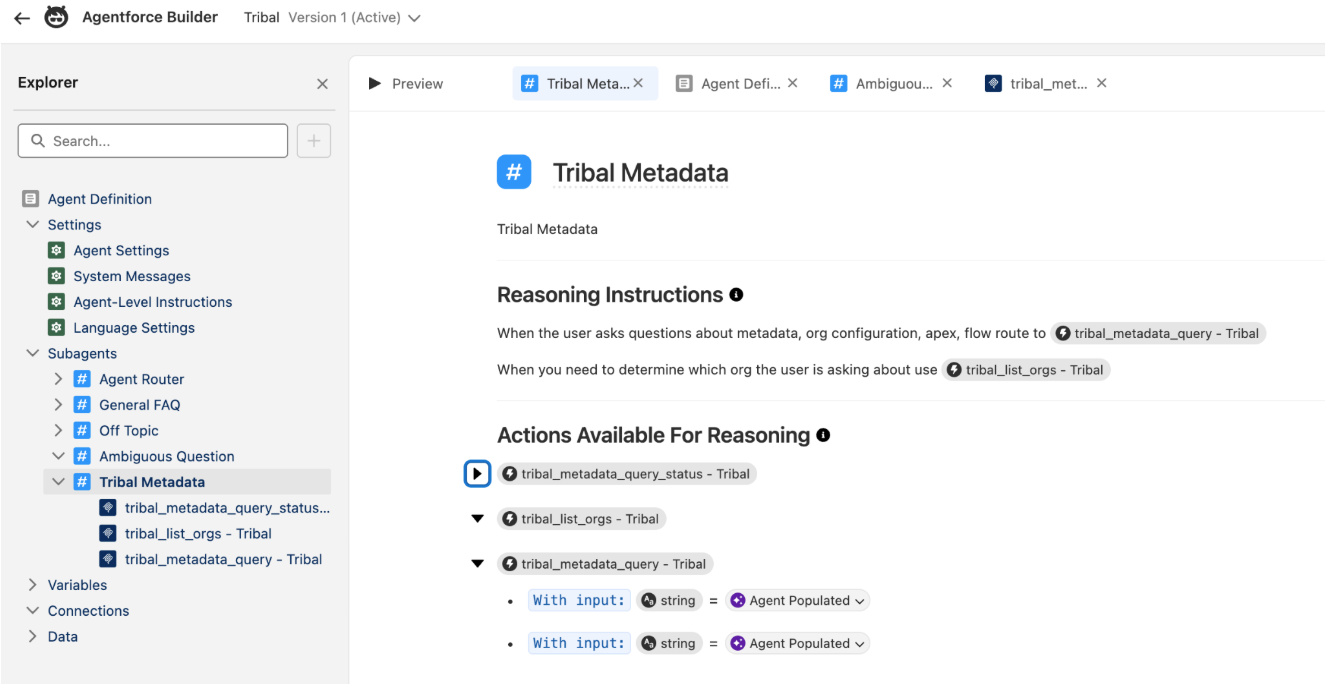
You will notice Tribal MCP gives answers via async engagement to allow it the maximum time to compile an accurate answer. Agentforce does handle that background work to a degree. It will tell the user that the work has started, but it does not automatically monitor for it completing. It keeps the Tribal query Id in its state, and when you prompt it to check the status it responds as you would expect. The Tribal product team is investigating a fallback on the background-processing timeout that waits up to the maximum of 60 seconds, so less complex responses can return directly if they come in under this Agentforce timeout.
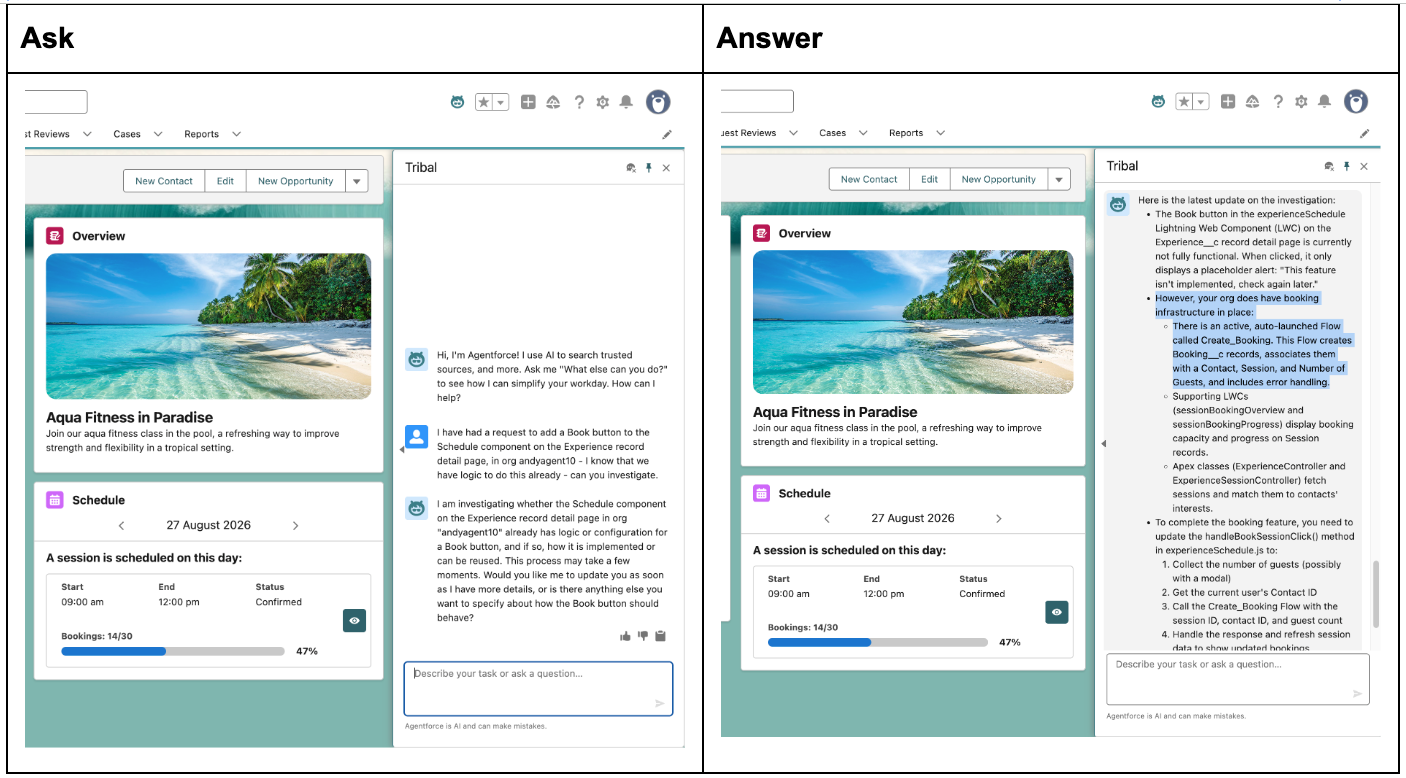
Below is me asking my standard CoralCloud question about adding an internal Booking button to the Experiences record detail page. As I mentioned in my last blog, and highlighted in the answer below, Tribal was able to spot existing logic (even written in Flow) that could be reused.
What the bake-off showed
Developer agents are capable. Cursor, with no metadata source in the project and no Tribal, knows its way around the Salesforce APIs surprisingly well these days, as does Vibes. Vibes and Setup Agent both return useful answers; Setup Agent stays within the actions it ships with, rather than the wider Salesforce API surface. Cursor and Vibes will, if asked, look at other authorised orgs and perform queries in each and aggregate results — it's a chatty process for sure though.
Tribal MCP on the other hand was less chatty with only one query tool, and though it was slower it was much more thoughtful in its response and can already see multiple orgs it's attached to — so it aggregates within itself, not at the agent level. Tribal also goes beyond reading just metadata and looks at permission set assignment topology, so it knows what the impact is on users, not just the org config itself.
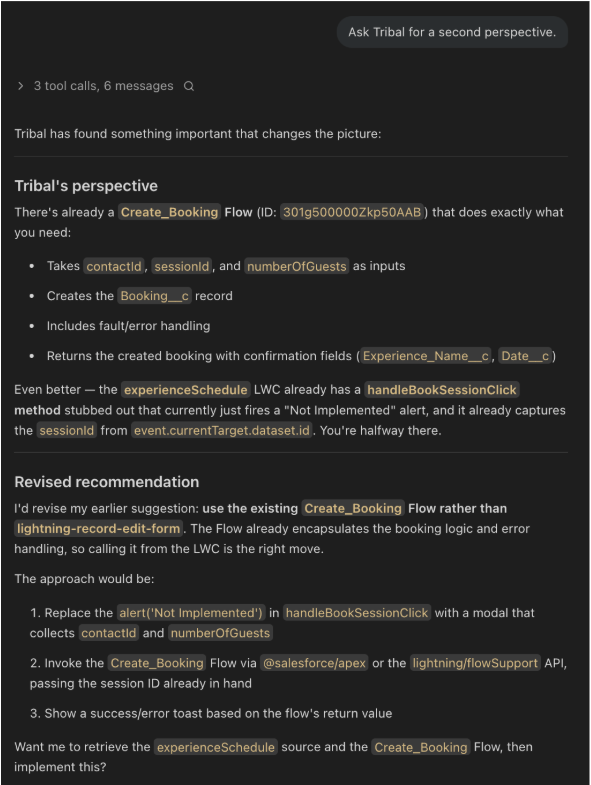
For me though as a developer, the Cursor+Tribal, or Vibes+Tribal is the clear winner — it was fun to see them working across the tool chains and Vibes reassessing Tribal answers and agreeing they were superior in one instance. But I also wanted to explore further via my employee agent within Salesforce UI.
Use case: what is installed across my orgs?
I started with the question that only really pays off once you have more than one org:
“ What packages are installed in this org (andyagent10) compared to andyagent1? “
Without a shared picture of the estate, you ask that in each org and stitch the answers together. Cursor can list packages in the org it can see, there is a clean object for that, but it is still one org at a time, likewise Vibes. Tribal already has the connected orgs in its fabric, so one question covers the estate: what is installed, where, which versions, and what is behind. In the Vibes + Tribal runs it also resolved which org? for me, instead of making me name it each time — a nice result of the two of them working together.
Here is what my Agentforce Employee agent looked like answering this question:
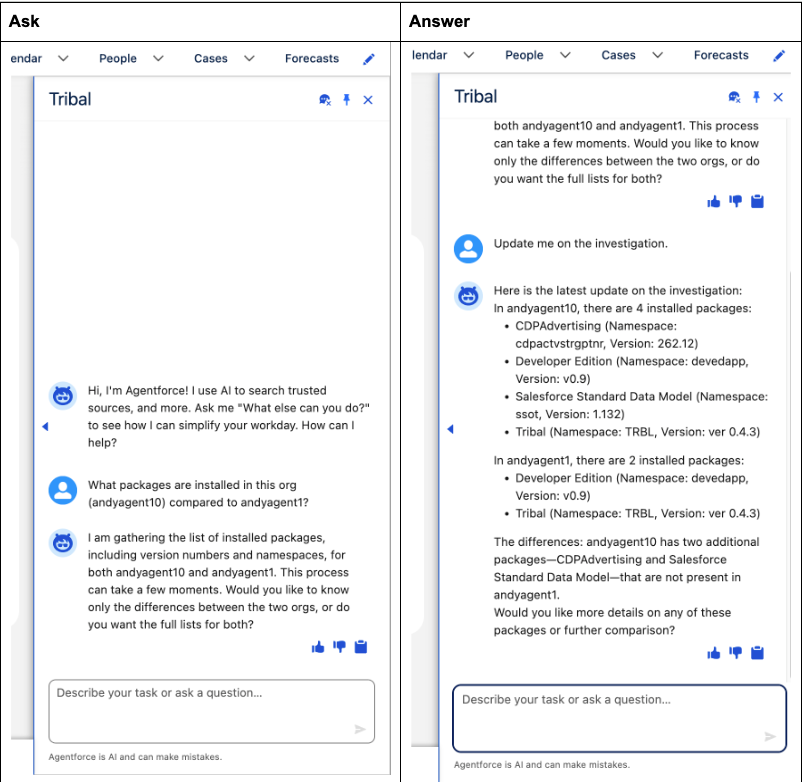
So that was a cross-org insight. You can also compare fields on a given object across orgs, look for validation rules etc — really any question you could ask before about one org can now be asked as an aggregate cross-org question. The next two questions go deeper on an application already in those orgs.
Use case: where is this used?
On the Coral Cloud org from that earlier setup I asked:
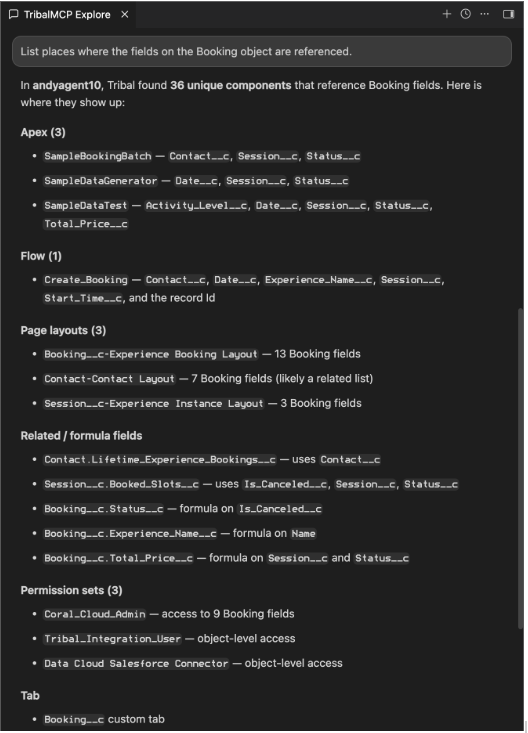
“ List places where the fields on the Booking object are referenced. “
Booking sits at the heart of Coral Cloud. This is the daily “can I touch this?” question. Who reads those fields? Which Flows, Apex, validation rules, reports, Lightning pages? And which profiles and permission sets actually expose them?
Tribal is noticeably stronger on usage. It does not stop at metadata references, nor the usual limits relating to the metadata dependency API. It brings security surfaces into the same answer: profile and permission set usage that tells you whether a field is a quiet implementation detail or something half the org can see. That is the difference between “here are some references” and “here is the blast radius.”
Vibes can attempt the same scan, and with Tribal connected it gets better. In some of my runs it also summarised Tribal’s list, so some of the detail was truncated, which is something to watch out for, likely also something Cursor might do as well.
Use case: what breaks if I change it?
The follow-on from “where is it used?” is impact.
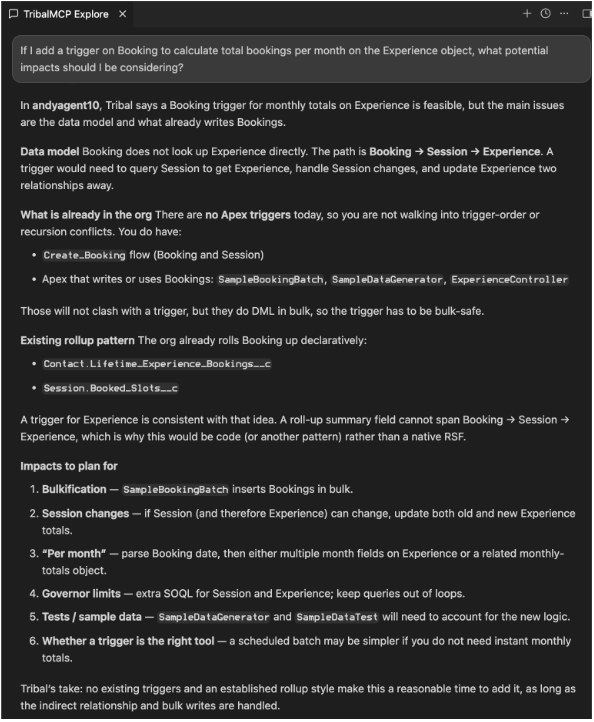
“ If I add a trigger on Booking to calculate total bookings per month on the Experience object, what potential impacts should I be considering? “
This is the conversation before someone writes a trigger against an application that is already in the org. Coral Cloud already has automation around Booking and Experience. The question is what a new trigger would collide with: existing Flows, roll-up or query patterns, order of execution, recursion — and whether the job is even a trigger, a Flow, or a scheduled job.
Vanilla Vibes gave solid general Salesforce guidance, integrated in with actual results from the org; however, I must admit that having this all mingled together made it harder to digest. Tribal stayed with the codebase only: what is already true in this application, and what the change would hit. Only when it gave me the facts did it deliver some solid suggestions regarding the impact plan, including my personal favourite question "do you really need this realtime?" when being asked about adding trigger logic.
For those working across orgs and sharing logic, the following question can also be asked:
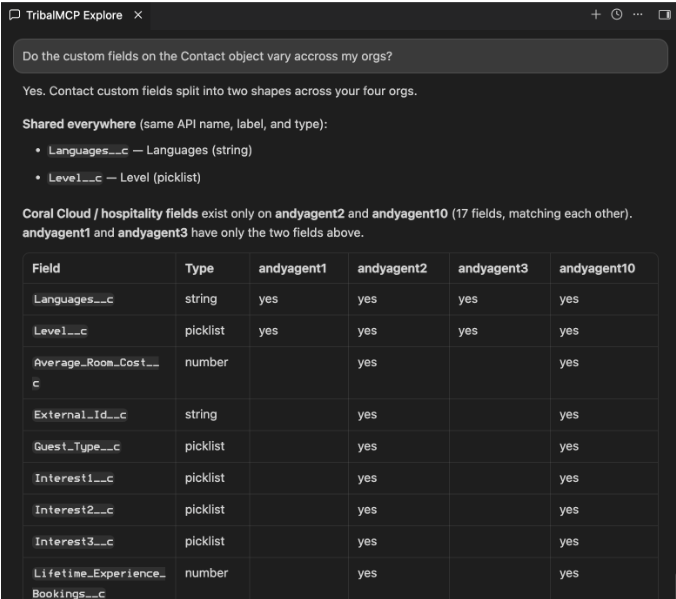
“ Do the custom fields on the Contact object vary across my orgs? “
That question succeeded cleanly with Cursor + Tribal, rendering a nice table:
Two doors for the combo win!
Tribal brings deeper intelligence over not one but all connected orgs and can do so in aggregate within one prompt. With Tribal MCP it is now possible to meet users where they are at in their existing agents.
Door A — Agentforce Vibes / Cursor + Tribal, for developers
Connect Tribal MCP to Vibes and ask the questions above. Two things happened in testing that I did not expect. Tribal already knows the org estate, so “which org?” is answered from that list. Vibes often starts on its own tools. After I asked it for a second opinion via Tribal, it said the Tribal-backed answer was more correct, then started deferring to Tribal first. In one run it framed the Tribal response as “Tribal has found something important that changes the picture.”
Caveats, Vibes and Cursor will re-work and sometimes truncate Tribal’s answers. Additionally it will sometimes call Tribal more times than it needs to, after I corrected it it started passing aggregate requests more cleanly. The product team can likely reduce this by tweaking the Tribal MCP tool descriptions.
Door B — Employee Agent + Tribal MCP, in the org
Employee Agent is customisable, so Agentforce External MCP support enables this door. Cross-org analysis inside a Salesforce Agent experience is the standout outcome from these tests - aside from Data 360 Salesforce rarely gives us tools to really integrate orgs this way. Packages, field usage, change impact, drift — a conversation in the org, not only a project in an IDE. Setup Agent is not extensible today sadly otherwise that would be a more natural place. For now using an Employee Agent is the path.
Conclusion
I do not always need a new place to chat. I need Tribal behind the agent I already have!
.png)
.png)